Insurance (pension) record is the period during which a person was covered by mandatory state pension insurance and for which monthly insurance contributions were paid in an amount not less than the minimum contribution.
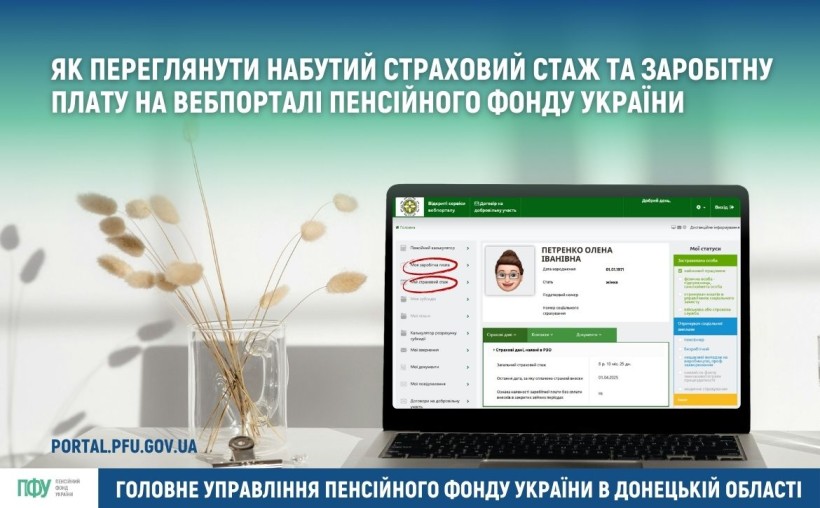
To view your accumulated insurance record and salary, you need to:
✅ Log in to your personal account on the Pension Fund of Ukraine’s electronic services web portal https://portal.pfu.gov.ua using a qualified electronic signature (QES), a bank card (BankID), or Diia.Signature;
➡️ In the left-side menu, select “My Insurance Record” — you will see data on your insurance record according to the information used to calculate pensions, broken down by employer, starting from 2004;
➡️ In the left-side menu, select “My Salary” — you will see data on the total amount of salary, the portion of salary within the maximum base for SSC (Unified Social Contribution) accrual, and the amount taken into account for pension calculation.
🗓 From January 1, 2004, only those periods during which insurance contributions were paid are counted toward the insurance record, and they are credited proportionally to the contributions paid.
📘 Insurance record acquired before January 1, 2004 is confirmed by the employment record book (labor book).
📲 You can also view your insurance record via the “Pension Fund” mobile app 👉 https://t1p.de/2b287.
❓ How to independently upload a scanned copy of your employment record book for digitization — see the instructions ➡️ https://t1p.de/8933s or watch the video guide ▶️ https://t1p.de/fjrs9.